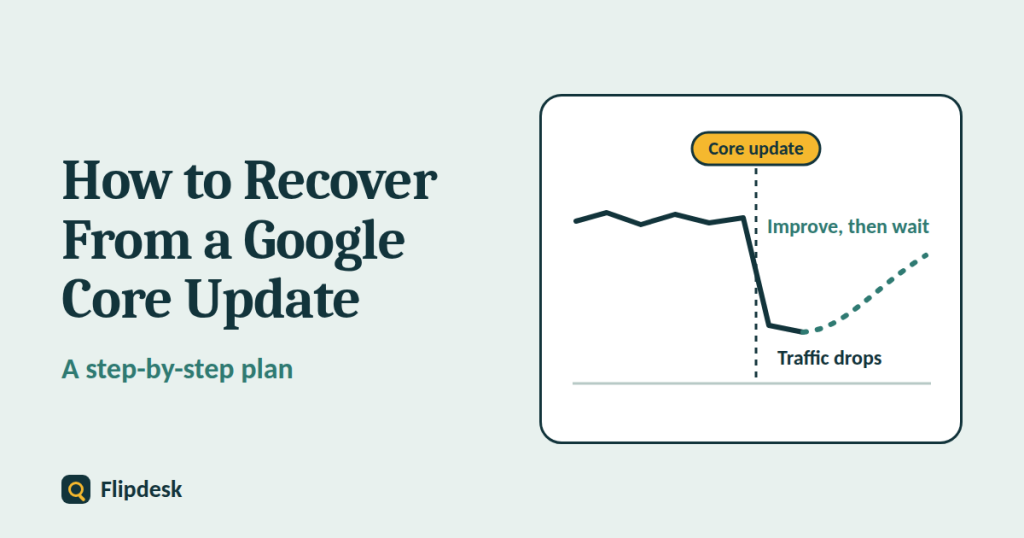
Watching your traffic fall right after a Google core update is stressful, and the temptation is to change everything at once. That is usually the wrong move.
This guide gives you a calm, step-by-step plan: confirm that the update really caused the drop, measure it properly in Search Console, assess your content honestly, fix what deserves fixing, and then wait with realistic expectations. It is based on Google’s own documentation on core updates, which we link to at the end.
What is a Google core update?
Several times a year, Google makes significant, broad changes to its search systems. These are called core updates, and Google lists them on its Search Status Dashboard. They are designed to improve how well results match what searchers need, and they do not target specific sites or individual pages.
Most sites never notice a core update. If yours moved, it does not automatically mean it did something wrong. Think of it like re-ranking a list of your favorite restaurants: new places open, you reassess old ones, and some drop down the list even though they are still good.
Core update vs spam update vs manual action
Before you do anything, make sure you know what you are dealing with. These three causes of a traffic drop need different responses.
| Cause | What it is | Where to check | What to do |
|---|---|---|---|
| Core update | A broad change to ranking systems, with no specific target | Search Status Dashboard, plus the timing of your drop | Assess your content and improve it over time |
| Spam update | An update aimed at pages that break Google’s spam policies | Search Status Dashboard | Check your site against the spam policies and fix any violations |
| Manual action | A human reviewer applied a penalty and Google tells you | Search Console, under Security and Manual Actions | Fix the problem, then submit a reconsideration request |
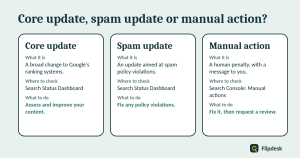
Only a manual action comes with a message in Search Console and a formal reconsideration process. There is nothing to submit after a core update.
Step 1: Confirm the drop lines up with a core update
Check the Google Search Status Dashboard
Visit the Search Status Dashboard and look at the list of ranking updates. Note the start date and the end date of the core update. A drop that began well before or well after those dates may have a different cause.
Rule out other causes first
Before blaming Google, check the simpler explanations:
- A tracking problem, such as a broken analytics tag
- Normal seasonality in your topic
- A recent site change, theme switch, migration or URL change
- Indexing problems, which you can find in the Page indexing report (see our guide to setting up Google Search Console)
- A manual action or security issue in Search Console (see our guide on how to check whether a domain has a Google penalty)
- Hosting downtime or slow server responses
If none of these fits, the timing of a core update becomes the most likely explanation.
Step 2: Wait, then compare the right dates in Search Console
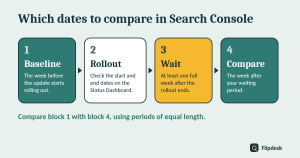
Wait a full week after the rollout ends
Core updates take time to roll out, and rankings keep moving while they do. Google recommends waiting until the update has completed, and then at least one full week more, before you analyze your site. Analyzing too early means you are reading noise.
Compare the right periods
Compare the week before with the week after
In Search Console, open Performance > Search results, click the Date filter and choose the Compare tab. Compare the week after your waiting period with the week before the update started rolling out. Use periods of the same length so the numbers are fair.
Look at pages and queries
With the comparison switched on, open the Pages tab and the Queries tab. Sort by the change in clicks to see which pages and which searches lost the most. Write down your top ten losers.
Analyse search types separately
Use the Search type filter to look at Web, Images, Video and News on their own. A drop in image traffic needs a different response from a drop in web results.
Decide: small drop or large drop?
- Small drop in position, for example from position 2 to position 4: do not take drastic action. Avoid changing content that is already performing well.
- Large and sustained drop, for example from position 4 to position 29: do the deeper assessment in the next step.
Step 3: Assess your content honestly
When the drop is large, Google’s advice is to look at your site as a whole, not just single pages, and to try to be objective.
Look at the pages that lost the most
Open your top losers and look for patterns. Are they thin? Out of date? All the same type of page? Do they answer a different question from the one the searcher asked?
Ask the self-assessment questions
For each important page, ask yourself:
- Does it offer original information, insight or analysis, or does it mostly reword what other pages say?
- Does it cover the topic completely?
- Would a reader finish with what they needed, without going back to search again?
- Does it show first-hand experience, and is it clear who wrote it and why you can trust them?
- Was it written to help people, or mainly to catch searches?
- Is it free of errors, clutter and anything that makes it hard to use?
- Would you trust it, bookmark it or recommend it to a friend?
Compare yourself with the pages that now rank above you
Search the keywords you lost and read the pages that now rank above you. What do they do better? Look at depth, freshness, examples, format, clarity and who is behind the content. Be honest. Sometimes another page simply helps the searcher more.
Ask someone unaffiliated for an honest review
Ask a person you trust, who has no connection to your site, to read your most affected pages and answer the same questions. Fresh eyes spot problems you have stopped seeing.
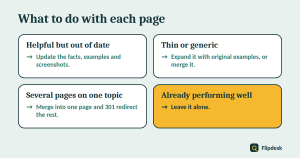
Step 4: Decide what to do with each page
Do not treat every page the same way. Group your affected pages and choose an action for each group.
| Situation | What to do |
|---|---|
| Helpful but out of date | Update the facts, examples and screenshots |
| Thin or generic | Expand it with original examples, or merge it into a related page |
| Several pages on the same topic | Merge them into one stronger page and 301 redirect the others |
| Does not match search intent | Rewrite it in the format that people are actually shown |
| Made mainly for search, with little value to readers | Consider removing it, but only as a last resort |
| Already performing well | Leave it alone |
Improve before you delete
Google describes deleting content as a last resort, to be considered only when a page cannot be salvaged. If you find yourself wanting to delete whole sections of your site, that is often a sign those sections were created for search engines first and people second. In that case, removing the unhelpful content can help your good content perform better. Otherwise, improve first.
Avoid quick fixes
- Do not remove page elements just because someone online said they are bad for SEO.
- Do not delete large numbers of pages in a panic.
- Do not rewrite the whole site in a week.
- Do not buy links or publish large amounts of low-quality content to replace lost traffic.
- Do not change URLs without adding 301 redirects.
Step 5: Improve the whole site, not just single pages
Show real experience and expertise
Add your own screenshots, results, case studies and mistakes. Give every article a named author with a short bio, and write a proper About page that explains who runs the site and why you know the subject.
Build trust
Make sure your contact details, privacy policy and affiliate disclosure are easy to find. Cite your sources. Only change the published date when you have genuinely updated the content.
Improve readability and usability
Check your pages on a phone. Remove anything that gets in the way, such as pop-ups that block the content or layouts that bury the answer. Use clear headings and short paragraphs, as explained in our on-page SEO checklist for beginners.
Strengthen your topic focus and internal links
Sites that cover a subject in depth tend to look more useful than sites that publish scattered posts. Group related articles into clusters and link them together with descriptive anchor text. Our guide to keyword research for a new blog explains how to plan clusters.
Keep publishing useful content
Recovery is easier when your site keeps growing in quality. Keep adding articles that are original, accurate and written for a real reader.
Step 6: Track progress and be patient
How long does recovery take?
Some changes can show an effect in a few days. But Google says it can take several months for its systems to learn that a site is now consistently producing helpful, reliable content. If a few months pass with no change, you may have to wait for the next core update. Smaller, unannounced core updates also happen, and they can lift pages that have genuinely improved.
Google is also clear that improvements are not a guarantee of recovery, and that no page has a fixed position in search results.
Keep a change log
Keep a simple spreadsheet with four columns: date, page, what you changed and why. When your traffic moves, you will know which changes might have caused it, and you will avoid changing too many things at once.
What to track each week
- Clicks, impressions and average position for your key pages
- Your top queries and which of them are recovering
- New pages indexed and the pages you have updated
When nothing happens
That can be frustrating, but it does not always mean you did something wrong. Competitors also improve, and positions in Google are never static. Keep improving your content and compare your progress over months, not days.
Core update recovery checklist
Confirm
- Check the dates on the Search Status Dashboard
- Rule out tracking errors, site changes, indexing problems and manual actions
Measure
- Wait one full week after the rollout ends
- Compare the week before the update started with the week after your waiting period
- List the top pages and queries that lost the most
- Check Web, Images, Video and News separately
Assess
- Review the most affected pages against the self-assessment questions
- Compare with the pages that now rank above you
- Ask someone unaffiliated for an honest review
Act
- Update, expand or merge pages according to the decision table
- Leave well-performing pages alone
- Delete only as a last resort, and use 301 redirects when you merge
- Improve the About page, author bios and trust pages
Track
- Keep a change log
- Review Search Console weekly
- Judge progress over months
Frequently asked questions
Is a Google core update a penalty?
No. A core update is a broad change to how Google’s systems rank pages. It does not target specific sites, and it is different from a manual action.
How long does it take to recover from a core update?
There is no fixed answer. Some changes show up within days, but it can take several months, and in some cases you may need to wait for the next core update.
Do I have to wait for the next core update to recover?
Not necessarily. Google also makes smaller, unannounced core updates, and improvements can show up between big ones. But there is no guarantee either way.
Should I delete my low-traffic pages?
Not automatically. Deleting content is a last resort. First try to update, expand or merge the page, and delete only pages that cannot be salvaged.
Can I submit a reconsideration request after a core update?
No. Reconsideration requests are only for manual actions. Core updates have no request process.
How often do core updates happen?
Several times a year, with no fixed schedule. Google lists them on the Search Status Dashboard.
Will my site return to its old position?
It might, but it is not guaranteed. Positions in Google are never fixed, because searchers’ needs and the web itself keep changing.
Conclusion
Recovering from a Google core update is not about finding a secret fix. It is about measuring the drop properly, being honest about where your content falls short, improving it in ways that help real readers, and giving the changes time to work.
Start today by checking the Search Status Dashboard, noting the update dates and setting a reminder for one week after the rollout ends. Then work through the steps above in order. If your problem turns out to be a penalty rather than a core update, read our guide on how to check whether a domain has a Google penalty next.