What is on-page SEO?
On-page SEO is the practice of improving the things on a page that you control, so that search engines and readers can easily understand what the page is about. That includes your content, title tag, meta description, headings, URL, images and links.
On-page, off-page and technical SEO
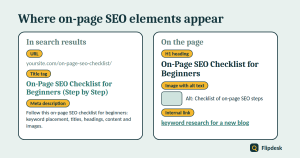
- On-page SEO: what is on the page itself, such as content, titles, headings, images and internal links.
- Off-page SEO: signals from outside your site, mainly links from other websites.
- Technical SEO: how easily your site can be crawled, indexed and loaded, including sitemaps, speed and mobile usability. Our guide to setting up Google Search Console covers the basics.
For a beginner, on-page SEO is the best place to start, because it is the part you fully control.
Before you start: choose one keyword for the page
Every page should target one primary keyword and one clear search intent. If you have not done keyword research yet, read our guide to keyword research for a new blog first. Then write down three things:
- your primary keyword
- three to five related phrases or questions
- the search intent: does the reader want to learn, compare or buy?
Step 1: Match the search intent
Search intent is what a person wants when they type a query. Google tends to show the type of page that satisfies it best, so matching that format matters more than any tweak you make later.
Check the top results
Search your keyword and open the top five results. Note the format (how-to guide, list, comparison or product page), roughly how long they are, and which questions they answer.
Choose the right format
If the top results are step-by-step guides, write a step-by-step guide. If they are lists, write a list. Do not write a sales page for a search where Google shows guides. Once you have matched the format, aim to be clearer, more complete or more up to date than what is already there.
Step 2: Write a title tag and meta description that earn the click
Title tag
The title tag is the clickable headline in search results. It is one of the strongest on-page signals, and it is also your advert.
Title tag rules
- Put the primary keyword near the start, where it reads naturally.
- Aim for roughly 50 to 60 characters, so it is less likely to be cut off.
- Make it unique on every page.
- Describe the page honestly. A misleading title leads to quick exits.
- Google sometimes rewrites titles, so write one that makes sense on its own.
Meta description
The meta description is the short summary shown under the title in search results. It is not a direct ranking factor, but a clear one can improve the number of people who click.
- Keep it to about 150 to 160 characters.
- Include the primary keyword naturally.
- Tell the reader what they will get from the page.
- Write a unique one for every page. Google may rewrite it to suit the search, but it is still worth writing.
Step 3: Create a clean, short URL
A good URL is short, readable and describes the page.
- Use lowercase letters and hyphens between words.
- Include the primary keyword and drop filler words such as ‘the’, ‘a’ and ‘and’.
- Avoid dates and numbers that will age.
- Never change the URL of a published page without adding a 301 redirect from the old address.
In WordPress, go to Settings > Permalinks and choose the ‘Post name’ structure. You can then edit the slug of each post in the editor sidebar.
Step 4: Use a clear heading structure
Headings help readers scan the page and help Google understand how it is organised.
- H1: the title of the page. Use one per page. In WordPress, the post title is normally the H1, so do not add another inside the content.
- H2: the main sections of the page.
- H3: sub-points under an H2.
- H4: fine detail under an H3, used only when it is genuinely needed.
A simple example
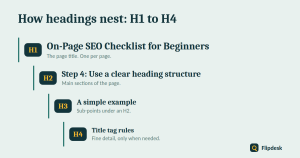
- H1: On-Page SEO Checklist for Beginners
- H2: Step 2: Write a title tag and meta description
- H3: Title tag
- H4: Title tag rules
- H3: Meta description
Heading tips
- Do not skip levels, for example jumping from an H2 straight to an H4.
- Use headings for structure, not to make text bigger or bolder.
- Include the primary keyword or a related phrase in one or two headings where it fits naturally.
- Phrase some headings as the questions people actually search for.
Step 5: Write helpful content that answers the search
Open with a direct answer
In the first 100 words, say what the page covers and give the short answer. Readers who find the answer quickly are more likely to keep reading, and a clear opening can also help your page win a featured snippet.
Show real experience
Add your own examples, screenshots, results and mistakes. Google’s quality guidelines talk about experience, expertise, authoritativeness and trust, often shortened to E-E-A-T. It is not a ranking switch, but content that shows first-hand knowledge is much harder to copy. Add an author name and a short bio too.
Use keywords naturally
Where to place your primary keyword
- the title tag and the H1
- the first paragraph
- one or two subheadings
- the URL and the meta description
- image alt text, where it honestly describes the image
What to avoid
There is no ideal keyword density, so ignore any tool that gives you a magic percentage. Repeating the same phrase unnaturally makes the page harder to read and does not help it rank. Use synonyms, related phrases and the questions people ask instead.
Make it easy to scan
- Keep paragraphs to two to four sentences.
- Use bullet points for lists and tables for comparisons.
- Add a short key takeaways box at the top.
- Finish with an FAQ that answers real questions, which you can find in the People Also Ask box.
Step 6: Optimise your images
Images make a page easier to read and can bring visitors from image search, but large files slow the page down.
Use descriptive file names
Rename images before you upload them. Use on-page-seo-checklist.png instead of IMG_4821.png, with lowercase letters and hyphens.
Write useful alt text
Alt text describes an image for people who cannot see it, such as screen reader users, and it helps Google understand the image. Describe what the image shows in a short, natural sentence, and include the keyword only when it fits. For purely decorative images, you can leave the alt text empty.
Compress and size your images
Compress images before you upload them, using a free tool such as Squoosh or an image optimisation plugin. Use WebP or JPEG for photos and PNG for graphics with flat colours. Do not upload a 4,000-pixel-wide image when your content area is only about 800 pixels wide. Finally, set a featured image for every post, because it appears in social media previews.
Step 7: Add internal and external links
Internal links
Internal links point from one page of your site to another. They help Google discover your pages, show how your topics relate and help readers move on to the next useful article.
- Add a few relevant internal links to every article, where they fit naturally.
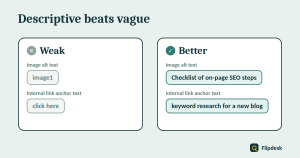
- Use descriptive anchor text, not ‘click here’.
- Link from older, related articles to your new one as well.
- Make sure every article is linked from at least one other page. A page with no internal links is hard for Google to find.
External links
Normal external links
Link to trustworthy sources, such as official documentation, when it helps the reader. Choose pages that are useful and likely to stay online.
Affiliate and sponsored links
Google asks that paid, sponsored and affiliate links are marked with rel=’sponsored’ (or nofollow). Many SEO plugins, including Rank Math, let you set this in the link settings. If your site uses affiliate links, mark them and keep a clear disclosure page.
Step 8: Check speed, mobile and structured data
Page speed and mobile friendliness
Most visitors arrive on a phone, so preview every article on one. Run an important page through PageSpeed Insights, which is free. Quick wins include compressed images, a lightweight theme, fewer heavy plugins and a caching plugin. Do not chase a perfect score. Fix the big problems first, such as oversized images.
Structured data
Structured data is code that helps search engines understand a page. Rank Math adds Article schema to your posts by default, and that is usually enough for a beginner. Google has sharply limited FAQ rich results, so do not add FAQ schema expecting extra visibility in search.
Step 9: Run the final pre-publish check
- Re-read the title, introduction and conclusion, and fix any typos.
- Preview the page on a phone.
- Click every link to make sure it works.
- Check the Rank Math panel for obvious gaps, such as a missing focus keyword, description or alt text.
- Publish, then inspect the URL in Search Console and request indexing.
What to trust (and what to ignore) in the Rank Math SEO score
Rank Math scores each page out of 100 using its own checks. It is useful for catching missed basics, but Google does not use that score, and a page does not rank better just because it reaches 100.
| Rank Math check | Should you act on it? |
|---|---|
| Focus keyword in title, URL and description | Yes, if it reads naturally |
| Missing image alt text | Yes |
| No internal or external links | Yes |
| Keyword density target | Ignore the exact number and write naturally |
| Content length | Treat it as a hint. Answer the question fully instead of chasing a word count |
| Short paragraphs and readability | Yes, it helps readers |
Weak vs better: examples at a glance
| Element | Weak | Better |
|---|---|---|
| Title tag | Blog post 1 | On-Page SEO Checklist for Beginners (Step by Step) |
| URL | /p=1482/ | /on-page-seo-checklist/ |
| Heading | Things to do | Step 3: Create a clean, short URL |
| Image alt text | image1 | Checklist of on-page SEO steps |
| Anchor text | click here | keyword research for a new blog |
Common on-page SEO mistakes
- Targeting several keywords on one page
- Ignoring search intent and writing the wrong type of page
- Stuffing keywords into every sentence
- Using more than one H1, or skipping heading levels
- Uploading huge, unnamed images with no alt text
- Publishing articles with no internal links
- Changing published URLs without a redirect
- Chasing a 100/100 plugin score instead of helping the reader
The complete on-page SEO checklist
Copy this list for every new article.
Before writing
- One primary keyword chosen
- Search intent checked against the top results
Title and snippet
- Title tag of about 50 to 60 characters, with the keyword near the start
- Meta description of about 150 to 160 characters
- Short URL that includes the keyword
Content
- One H1, with a logical H2, H3 and H4 structure
- Direct answer in the first 100 words
- Original examples and first-hand experience
- Keywords used naturally
- Short paragraphs, a key takeaways box and an FAQ
Images and links
- Images renamed, compressed and given alt text
- Featured image set
- Several relevant internal links with descriptive anchor text
- External links to trustworthy sources, with affiliate links marked
Final checks
- Previewed on mobile, links tested and text proofread
- URL inspected in Search Console and indexing requested
- Reminder set to review the article in a few months
Frequently asked questions
What is the most important on-page SEO factor?
There is no single factor. The foundation is helpful, original content that matches search intent. Titles, headings, links and images support it.
How many keywords should I use on one page?
One primary keyword, plus a handful of related phrases and questions that fit naturally.
How long should a blog post be for SEO?
There is no ideal length. It should be as long as it needs to be to answer the search completely, and no longer.
Is on-page SEO enough to rank?
No. On-page SEO makes your page clear and eligible to rank, but rankings also depend on competition, links and the overall strength of your site. It is simply the part you control first.
Do meta descriptions affect rankings?
Not directly. They can influence how many people click your result, which is why they are still worth writing.
Does the H1 have to match the title tag?
No, but they should be closely related so that readers and search engines see a consistent topic.
How often should I review my on-page SEO?
Review your key articles every few months. Update out-of-date information, and use Search Console to find pages with many impressions but few clicks, where a better title may help.
Conclusion
On-page SEO is not about tricks. It is about choosing one keyword, matching search intent, and making every page clear and genuinely useful, then repeating that process on every article.
Use the checklist above on your next post, then go back and apply it to your three most important existing pages. Once an article is live, check that Google has indexed it, as explained in our guide to setting up Google Search Console.