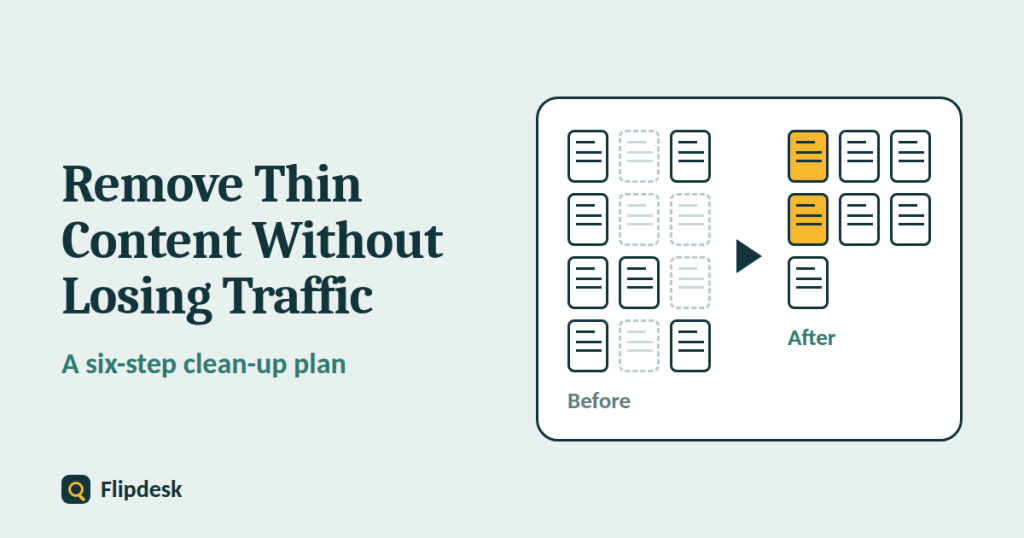
Somewhere on most websites there are pages that nobody needs: a short post written to hit a publishing target, five near-identical articles on one topic, empty tag pages, or product-style pages with copied descriptions. This is thin content, and clearing it up can make a site stronger.
But it is also easy to get wrong. Delete the wrong pages, or redirect them badly, and you can lose traffic and links you had already earned. This guide gives you a careful six-step process, so you can clean up without damaging what works.
What is thin content?
Thin content is about value, not word count
Thin content is a page that gives visitors little or no real value. There is no minimum word count that makes a page safe. A clear 300-word answer can be excellent, and a 2,000-word page padded with filler can be thin. Typical examples include:
- pages with very little original information
- pages copied or scraped from other sites
- automatically generated pages with no real insight
- affiliate pages that repeat the merchant’s description without adding anything
- doorway pages, which are near-identical pages built to rank for slightly different searches
- several pages on the same topic that say almost the same thing
- empty or near-empty structural pages, such as tag archives and internal search results
Why thin content can hurt
A site with many unhelpful pages can look less useful overall, which matters because broad ranking changes such as core updates look at your site as a whole. In more serious cases, Google can apply a manual action for ‘thin content with little or no added value’, which you would see in Search Console. Our guide on how to check whether a domain has a Google penalty explains how to look for one. Thin pages can also soak up crawling attention that your best pages deserve.
Low traffic does not always mean thin
A page with few visits is not automatically thin. It may be new, it may target a small but valuable audience, or it may be a necessary page such as a privacy policy or affiliate disclosure. Always look at value first, and traffic second.
Before you delete anything
Make a backup
Back up your site and database, so you can restore a page if you make a mistake. Most hosting companies offer one-click backups, and WordPress backup plugins can also do it.
Record your baseline
In Search Console, open Performance > Search results, set the date range to the longest available (up to 16 months) and use the Export button to save the data for your pages. This is your before picture. Without it, you will not be able to tell later whether the clean-up helped.
Step 1: Build a list of every page
Create a spreadsheet and list every indexable URL on the site. You can get the list from your Rank Math sitemap, from WordPress under Posts > All Posts, or from a crawler such as Screaming Frog, whose free version has a limit on the number of URLs.
Then add these columns for every page:
| Column | Where to get it |
|---|---|
| URL | Sitemap or crawler |
| Clicks and impressions (12 months) | Search Console, Performance report |
| Indexed or not | Search Console, Page indexing report |
| Backlinks | A backlink tool, or Ahrefs Webmaster Tools for sites you own |
| Word count and last updated | Crawler or WordPress |
| Internal links pointing to it | Crawler |
| Decision | You fill this in during Step 3 |
Step 2: Flag the thin candidates
Signs that a page may be thin
- It gives the same answer other pages do, with nothing original added
- It does not cover the topic or answer the follow-up questions
- It overlaps heavily with another page on your site
- It is mostly filler, ads or links, with little real information
- It has had very few impressions and clicks for a long time, even though it is old enough to have been judged
- It is an empty or auto-generated page
What not to flag on its own
- A page that is only short
- A page that is only new. Give new pages a few months before judging them.
- Legal and trust pages, such as privacy, terms, contact and affiliate disclosure
- A page with low traffic that still serves a clear purpose for readers
Step 3: Decide what to do with each page
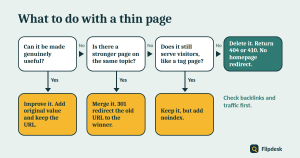
For each flagged page, choose one action. Work through the options in this order, because improving is usually better than removing.
| Situation | Action | Redirect? |
|---|---|---|
| The page has potential but is shallow | Improve it | No, keep the URL |
| Several weak pages cover the same topic | Merge them into one strong page | Yes, 301 the old URLs to the new one |
| The page is needed for the site to work but is useless in search, such as a tag archive | Add noindex | No |
| The page has backlinks or past traffic but no real value | Merge it or redirect it to the closest relevant page | Yes, 301 |
| The page has no traffic, no links and no value, and nothing replaces it | Delete it | No, let it return 404 or 410 |
Option 1: Improve the page
What improvement looks like
- Add original examples, screenshots and first-hand experience
- Answer the questions people ask next
- Update out-of-date facts
- Match the search intent better, as explained in our guide to keyword research for a new blog
- Improve the structure with clear headings and a short summary, as in our on-page SEO checklist for beginners
When to stop improving
If, after a real effort, you cannot say what unique value the page offers, it is a candidate for merging or removal. Do not keep rewriting a page that has no reason to exist.
Option 2: Merge the pages
Merging works best when several pages compete for the same topic.
- Choose the strongest URL as the winner, usually the one with the most traffic, links or history.
- Build one thorough article that combines the best parts of each page. Do not just paste the old text together.
- Update your internal links so they point to the winning URL.
- 301 redirect the old URLs to the winner.
Option 3: Noindex the page
Use noindex for pages that visitors still need but that have no value in search, such as tag archives, internal search results or thank-you pages. In Rank Math, open the page and go to Advanced > Robots Meta and choose No Index. For whole archive types, use Rank Math SEO > Titles & Meta.
Two cautions: remove noindexed pages from your sitemap, and do not block them in robots.txt. If Google cannot crawl a page, it cannot see the noindex tag.
Option 4: Delete the page
Delete a page only when it has no value, no links, no traffic worth keeping and no replacement. Let the old URL return a 404 or a 410. Google currently treats both the same way. Remove any internal links that point to it, take it out of your sitemap, and consider a helpful 404 page that guides visitors to your best content.
Step 4: Redirect the right way
Redirects are where most clean-ups go wrong, so follow these rules.
- Redirect to a close, relevant match. A 301 redirect tells Google the page has moved permanently, and it is a strong signal about which URL to use. Point it to a page that really replaces the old one.
- Do not redirect everything to your homepage. Google says that sending users to an unrelated page, such as the homepage, instead of returning a 404 can create what it calls soft 404 errors.
- Avoid redirect chains. Point the old URL straight to the final destination. Google follows a limited number of hops, up to 10 by default, but chains still waste time and can cause errors.
- Use a proper tool. In Rank Math, switch on the Redirections module under Rank Math SEO > Dashboard, then add each 301 under Rank Math SEO > Redirections.
- Update internal links. Edit your own links so they go to the new URL directly, rather than relying on the redirect.
Update your sitemap
Remove deleted and noindexed URLs from the sitemap. Rank Math does this automatically for deleted posts, but check the result after you finish.
Step 5: Roll out in small batches
Do not clean up the whole site in one afternoon. A safer approach is:
- Start with a small batch, for example 10 to 20 pages.
- Record the date and the changes in a change log.
- Wait a few weeks and check Search Console before you start the next batch.
- Avoid making large changes while a core update is rolling out, because you will not know what caused any movement in your traffic.
This is a sensible way of working rather than a rule from Google, but it protects you if something goes wrong.
Step 6: Monitor the results
Check indexing and errors
In the Page indexing report, confirm that deleted pages show as ‘Not found (404)’, noindexed pages show as ‘Excluded by noindex tag’, and merged pages are being redirected as planned. Fix any unexpected 404s straight away. Our guide to setting up Google Search Console explains these statuses.
Check traffic
Compare Performance data for your merged and improved pages with the baseline you recorded. Expect some movement in the first weeks. Judge the results after a few months, not days.
Be realistic
Removing thin content can help a site’s overall quality, but it does not guarantee that your traffic will rise. If your traffic dropped after a core update, work through our core update recovery guide as well.
A note for small and new blogs
If your blog has only a handful of posts, mass pruning is rarely the answer. You are better off making each post as helpful as you can, adding internal links between them and publishing new, useful articles. Save large clean-ups for sites that have built up a lot of weak pages over time.
Common content clean-up mistakes
- Deleting pages because of low traffic alone
- Redirecting every deleted page to the homepage
- Deleting pages that have backlinks without redirecting them
- Adding noindex and blocking the page in robots.txt at the same time
- Leaving removed URLs in the sitemap
- Pruning the whole site in one go
- Forgetting to update internal links
- Replacing thin pages with new filler content
Content clean-up checklist
Prepare
- Back up the site
- Export your Search Console performance data
Audit
- List every page with traffic, indexing, backlinks and word count
- Flag thin candidates, and leave legal and trust pages alone
Decide
- Improve pages that have potential
- Merge overlapping pages
- Noindex pages that are needed but useless in search
- Delete only pages with no value, no links and no replacement
Redirect
- Use 301 redirects only to close, relevant pages
- Avoid redirect chains and homepage redirects
- Update internal links and the sitemap
Monitor
- Work in small batches and keep a change log
- Check the Page indexing report and Performance report
- Judge results over months
Frequently asked questions
Is thin content the same as short content?
No. Thin content lacks value. A short page that fully answers a question is not thin, and a long page full of filler can be.
Should I delete pages that get zero traffic?
Not automatically. Check why. The page may be new, it may need improving, or it may be a necessary page. Delete a page only when it has no value and no replacement.
Should I use a 404 or a 410 for deleted pages?
Google currently treats them the same, so either is fine. Do not redirect deleted pages to the homepage.
Noindex or delete: which is better?
Use noindex when visitors still need the page but search engines do not. Delete the page when nobody needs it at all.
Will removing thin content raise my rankings?
It might help, but it is not guaranteed. Rankings depend on many things, including competition, links and the quality of your remaining content.
How long does it take to see results?
Google needs time to recrawl and reassess your site, so judge the results after weeks or months, not days.
How many pages should I remove at once?
Start with a small batch, and wait to see the effect before you continue.
Does word count matter?
There is no minimum word count. What matters is whether the page answers the search completely and gives the reader something useful.
Conclusion
A good content clean-up is careful, not aggressive. Find the pages that give readers little value, improve the ones that can be saved, merge the ones that overlap, noindex the ones that only serve the site, and delete only what has no reason to exist. Redirect with care, work in small batches and keep a record of every change.
Start today by exporting your Search Console data and building your page list. That one spreadsheet will guide every decision you make after it.